In-Page AI Agents: Why This Becomes the Standard Way to Deploy AI Copilots

The standard way to deploy an AI copilot is backwards.
You build a separate application: new frontend, new backend, new database. You integrate it into your product via API, iframe embed, or a separate browser tab. You manage two systems. You debug integration friction. You calculate costs across multiple API calls. You ask users to switch context to use it.
This approach made sense when AI models were expensive and unreliable. The overhead of separation was a reasonable hedge.
That constraint is now the problem.
What is emerging instead is a pattern called in-page AI agents, where the agent runs directly inside your web application's page, manipulates the DOM, reads the application's data structure, and executes commands without any separate backend.
This is becoming practical. It is becoming cost-effective. It is about to become standard.
The Architecture of In-Page Agents
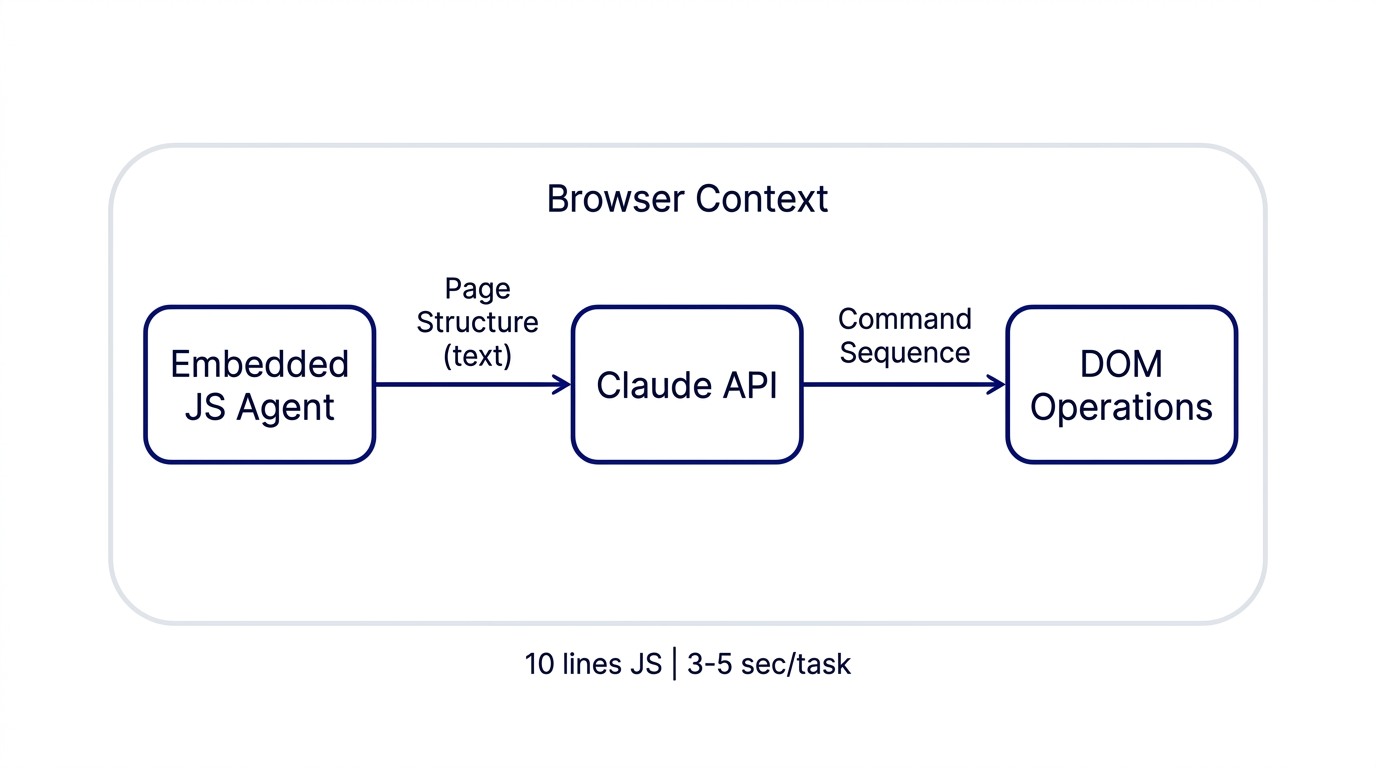
Instead of the agent living outside your application and trying to understand it by looking at screenshots, the agent runs as JavaScript inside the page. It has direct access to the DOM: the structured representation of your application's interface.
When a user makes a request ("extract the property details from this document"), here is what happens:
- The agent reads the current page structure and sends it as text to Claude.
- Claude sees the available fields, buttons, forms, and data.
- Claude responds with a sequence of commands: "Click the Upload Document button, wait for the form to appear, fill the Property Address field with..."
- The agent translates those commands to DOM operations.
- The operations execute in the browser.
- The agent captures the result and reports back to Claude.
- This loop continues until the task is complete.
The entire interaction lives in the browser. No separate copilot application. No iframe. No API gateway. Just the agent, the page, and Claude, all in one place.
This is how Page-Agent, an open-source library from Alibaba (4.2K GitHub stars, MIT license), works. It runs directly in the page as a TypeScript/JavaScript component. It wraps the page structure into a text representation that any LLM can understand. Claude responds with natural language commands. The agent translates them to DOM operations and executes.
Why Text-Based Beats Screenshot-Based
The dominant approach to browser automation has been screenshot-based. You take a screenshot of the page, send it to a vision model, ask the vision model what it sees and what to click, execute the click. This works, but it is expensive and slow.
Text-based interaction flips the trade-off. Instead of "show me a picture of your page," you use "tell me your page's structure."
The difference is significant:
- Cost. Screenshot-based agents using GPT-4 Vision run about $2.50 per task because vision model inference is expensive. Text-based agents using Claude cost about $0.30 per task. That is 8x cheaper.
- Speed. Screenshot-based agents take 30 to 45 seconds per task due to image encoding and decoding overhead. Text-based agents take 3 to 5 seconds.
- Reliability. Vision models struggle with rendering artifacts, overlapping UI, and small text. Text-based models read the actual DOM, so they know exactly what is available.
- Model flexibility. Vision-based requires expensive vision models. Text-based works with any LLM. The same architecture handles cost-conscious deployments and quality-focused deployments.
For most workflows, text-based is strictly superior. Better results, faster execution, lower cost.
The Maturity Signal
Five independent projects arrived in my research feed in the same week, all implementing this pattern:
- Page-Agent from Alibaba (TypeScript, 4.2K GitHub stars, MIT license, production-ready)
- Browser Use (JavaScript, similar architecture, growing adoption)
- SawyerHood's dev-browser (specifically for Claude Code, 4.2K stars, strong evaluation metrics)
- Multiple MCP implementations
- Community skill implementations in Claude Skills
When you see convergence like this: independent teams building similar systems, all reporting success, it signals a pattern moving from research to production. In-page agents are past the research phase.
Two Applications: Consulting and Product
The in-page agent pattern enables two different business models depending on your position.
If you are a consultant:
You can now offer AI Copilot Embedding as a packaged service. The workflow is straightforward:
- Identify a high-friction, repetitive workflow at your client. For example: valuers manually enter comparable properties into the system, or loan officers re-enter data from documents.
- Configure Page-Agent to that specific workflow. This is specialized customization: "The agent should extract property details from valuation documents and fill the form with that data." Not generic copilot configuration.
- Deploy. Hours or days, not months. A single JavaScript import into their web application.
- Train the client's team. One 30-minute session: "You can now ask the agent to extract properties, and it will fill the form."
The business model: RM 8,000 to RM 16,000 engagement, 8 to 16 hours of your work. That works out to RM 500 to RM 2,000 per hour effective rate, well above typical advisory billing.
Why is this defensible? Because the value is not in the technology. The value is in understanding the client's specific workflow, terminology, and integration points. You are not selling a generic copilot. You are customizing one to a specific business process. That is where you differentiate.
This connects to the Brief-then-Fire pattern: precise scoping before deployment is what makes this engagement type work at that price point.
If you build a product:
In-page agents change your strategic calculus for AI features. Instead of asking "should we build a separate copilot product?", you ask "which high-friction user workflow would benefit most from an embedded AI agent?"
Examples:
- Valuation platform. Can the agent help valuers extract comparable data from market documents without switching apps?
- Banking platform. Can the agent help loan officers extract key facts from documents and populate forms?
- Accounting software. Can the agent learn categorization rules and auto-categorize transactions?
- CRM. Can the agent help teams extract call notes and update records?
For each of these, you identify the workflow, embed Page-Agent, tune the prompt to your domain, and release it as a feature. The cost to build is dramatically lower than a separate copilot application. You are not writing a new frontend or building new APIs. You are writing configuration and prompt tuning.
The user experience is better because the agent is not a separate product. It is seamlessly integrated into the workflow they already use. Adoption is automatic.
This approach fits squarely in what I call Scope Compression and 0→1: find the smallest possible integration surface that produces the most visible user outcome.
The Economics Shift
Five years ago, AI was expensive ($2 to $5 per task), unreliable (high error rates), and required expensive deployment infrastructure. Embedding it directly in your product was risky. A separate application was safer.
Today: AI costs $0.30 to $1 per task, achieves 95%+ accuracy on well-structured tasks, and requires zero special infrastructure. Embedding it directly is now the low-risk option. The overhead of separation is the actual risk.
This shift changes what is viable to build. Workflows that were not worth automating (because the cost of a separate copilot exceeded the value) are now worth automating. Internal tools that would never justify a separate product can now justify in-page automation.
Implementation Details
The barrier to entry is genuinely low.
For consultants:
- Clone Page-Agent from GitHub (Alibaba/page-agent, MIT license).
- Work with a client to identify a target workflow.
- Configure the agent for that workflow: usually 4 to 8 hours of customization.
- Test with real users: 1 to 2 day pilot.
- Deploy: usually a single JavaScript import.
- Bill for the customization and deployment, not for the tool itself.
For product builders:
- Identify a workflow that causes user friction.
- Integrate Page-Agent into that workflow: usually 2 to 3 days of engineering.
- Tune the prompt to your domain: usually 1 to 2 days.
- Ship as a feature.
This is not a multi-quarter initiative. This is a 2 to 4 week project with clear ROI.
The Broader Shift
What is happening with in-page agents is part of a larger architectural shift in how AI gets deployed:
- Separate systems are becoming embedded systems.
- Screenshot-based interaction is becoming text-based interaction.
- High cost and low reliability are becoming low cost and high reliability.
- Separate product teams are becoming integrated feature teams.
This is the direction every deployment is trending. In-page agents are not a novelty. They are the template for how AI gets built into products and services going forward.
If you advise on product strategy, this is the pattern to understand. If you build products, this is the feature category to prioritize. If you consult on technology, this is the capability to recommend. If you run a small consulting practice, this is the service offering to launch.
The in-page AI agent is not the future. It is becoming the present.
Strategy and technology are the same decision. Over 15 years in fintech (CTOS, D&B), prop-tech (PropertyGuru DataSense), and digital startups, I have built frameworks that help founders and executives make both moves at once. Based in Kuala Lumpur.
Working on a 0→1 product?
I help founders and operators go from idea to validated product. Let's talk about yours.
Get in touch →